Introduction
In 2025, a transformative shift is underway in portable gaming: the convergence of high-power Windows handheld PCs and augmented-reality (AR) glasses is making the traditional large monitor or TV less necessary. Imagine using a handheld gaming device like a mini PC and projecting a massive, high-fidelity virtual screen directly in front of your eyes — with the precision, color fidelity, and freedom of a desktop station, but the portability of a handheld. That’s screenless gaming come alive. This article explores why this moment is arriving now, what makes this setup possible, and what gamers should know to take advantage of it.
1. Why now? The enabling technologies
Several technology trends have come together to make screenless gaming viable in 2025:
1.1 Powerful Windows handheld PCs
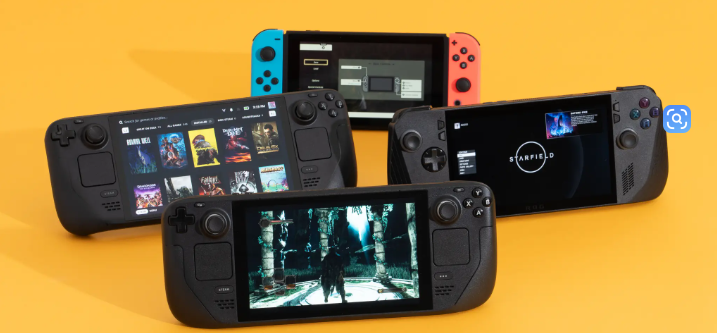
Handheld gaming PCs running Windows 11 (e.g., devices from Valve, ASUS, Lenovo, GPD) now offer near-desktop performance in compact form factors. With USB-C/Thunderbolt/DisplayPort Alt Mode support, these devices can drive high-quality external displays or AR glasses easily.
1.2 Mature AR glasses with micro-OLED displays
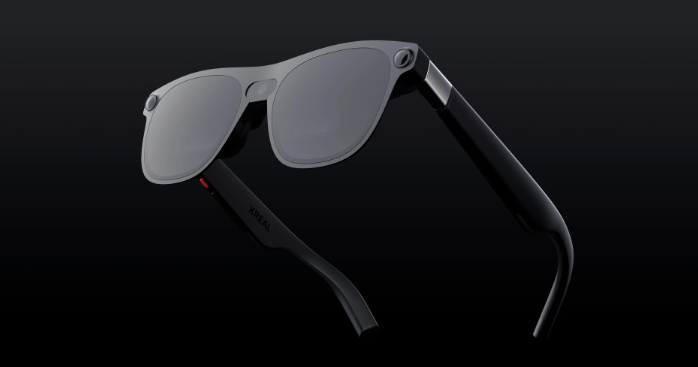
AR glasses designed for gaming now feature micro-OLED or high-quality microdisplays, high refresh rates (90–120 Hz), wide color gamut and low latency. For example, certain models support 120 Hz refresh and 130-inch virtual screen size when viewed in AR. Laptop Mag+2Amazon+2
1.3 High-speed, low-latency display output
Modern handhelds support DisplayPort over USB-C, USB4, and other high-bandwidth, low-latency video output. This means the AR glasses can receive high-refresh, high-resolution signals with minimal delay — key for gaming.
1.4 Freedom of placement & form-factor
With AR glasses, you are no longer tethered to a fixed big screen or bulky monitor. You can game in bed, on a train, in a hotel room, or on a couch — your “screen” can be wherever you are. The portability becomes real.
Because of these converging trends, 2025 is increasingly being seen as the year where “screenless gaming” moves from concept to practical reality.
2. What “screenless gaming” means in practice
2.1 Definition
Screenless gaming here refers to gaming without relying on a traditional large screen (TV, monitor) — instead using AR glasses or wearable displays to create a virtual big screen, while the processing is done by a handheld PC/console.
2.2 Typical setup
- A Windows handheld gaming PC (e.g., Steam Deck, ASUS/ROG, Lenovo Legion Go)
- AR glasses connected via USB-C/DisplayPort that provide a virtual display field (e.g., 120″, 150″, even 200″ equivalents)
- Handheld supplies the compute, game library, controls; AR glasses provide immersive visuals
- Optional docking, external battery, wireless streaming if needed
2.3 What gamers gain
- Huge “screen” size in a portable form: AR glasses can simulate very large virtual displays (e.g., over 100″) without needing physical space.
- Better color and immersion: micro-OLED AR glasses typically offer excellent contrast and color fidelity.
- Privacy & portability: No need to set up TV or monitor; you see your own display regardless of surroundings.
- Flexibility of location: You can game in places where setting up a monitor is impractical — travel, small rooms, lounging.
- Reduced dependence on large peripherals: Instead of bulky monitor + desk, you carry one handheld + glasses.
3. Why this setup can equal or beat a desktop monitor experience
3.1 Virtual screen size and perceived resolution
AR glasses create a virtual projection that appears very large (e.g., 100–200″) depending on optics and viewing distance. This means even a modest handheld display output can feel like a massive screen, increasing immersion beyond a typical desk monitor.
3.2 Color, contrast and micro-OLED advantages
Because many AR glasses use self-emissive displays (micro-OLED), they can deliver deep blacks, high contrast and wide color gamut in a near-eye format. When paired with a handheld PC that outputs high fidelity video, the viewers get desktop-class visuals without needing a big display.
3.3 Reduced ambient light interference
Traditional monitors are impacted by room lighting, reflections and viewing angle. AR glasses isolate the viewer’s field of view and reduce these factors, making visual fidelity more consistent in varying environments.
3.4 Mobility & deployment flexibility
No need to carry a large monitor, cables, or dedicate desk space. You can instantly turn any location into your “gaming station” by plugging the handheld into the AR glasses.
4. Leading products & price indications (2025)
Here are some AR glasses that align well with screenless handheld gaming setups:
- Xreal Air 2 / Air 2 Ultra — micro-OLED AR glasses supporting handheld gaming via USB-C. Price promotional deals around ~$249–$699. Laptop Mag+1
- RayNeo Air 3s / Air 3s Pro — gaming-oriented AR glasses with 120 Hz refresh rate, large virtual screen size, color-accurate specs. Approx price ~$269 (base) to ~$419+. RayNeo+1
- VITURE Luma/XR Glasses — wearable display brand positioning their glasses for handheld consoles like the Steam Deck/ROG Ally. Price around ~$399. Viture
These indicate the affordability and maturity of AR display hardware that pairs nicely with handheld gaming in 2025.
5. How to deploy the setup effectively
5.1 Check compatibility
Ensure your handheld supports DisplayPort alt mode or USB-C video output. Many Windows handhelds released in 2024-25 have this capability by default.
5.2 Optimize for latency
For gaming responsiveness, prefer a wired connection to AR glasses rather than wireless mirroring. Use high-quality USB-C cable, enable high refresh rate output (90-120 Hz), and disable extra processing layers.
5.3 Adjust display settings
In the handheld’s graphics settings: choose frame rate target that matches AR glasses (e.g., 120 Hz), set resolution to balance performance and fidelity (e.g., 1080p/1440p). In the AR glasses, calibrate IPD (interpupillary distance) and brightness.
5.4 Manage ergonomics & comfort
Wearing AR glasses for extended sessions requires comfort: ensure lightweight glasses, balanced head strap, good ventilation, appropriate brightness to avoid eye fatigue.
5.5 Use appropriate ambient environment
While AR reduces many external distractions, good ambient lighting and minimal glare can improve experience. For travel or couch use, choose setup where handheld and power supply are accessible.
6. Limitations and what to watch out for
- Battery life & power: Handhelds may draw significant power when driving high-fidelity AR output; keep an eye on battery usage.
- Surface texture & FOV: AR glasses often have narrower field of view than real world monitors; means smaller perceived peripheral view in some cases.
- Gaming library & input: While handhelds support many PC games, some titles may require controller/key mapping adjustments.
- Comfort & wear-time: Long use may cause neck strain or eye fatigue, especially if glasses are heavier.
- Cost of accessories: While AR glasses are now more affordable, high-end models still cost several hundred dollars; combining with a handheld is an investment.
- Future ecosystem maturity: Some AR-gaming workflows still depend on firmware/driver updates for latency and compatibility improvements.
7. Why 2025 specifically marks the tipping point
- The hardware (handheld PCs + AR glasses) reached a level affordable by mainstream gamers, not just early adopters.
- Accessory ecosystems (USB-C video output, handheld docking, AR glasses optimized for gaming) matured significantly.
- Until now, many AR solutions were either too expensive, too bulky or lacked low-latency gaming support. In 2025, multiple products achieve viable gaming specs.
- Mobility and hybrid work/lifestyle trends increased demand for flexible gaming setups — screenless gaming aligns with that mobility wave.
- Review and market commentary increasingly highlight AR glasses + handheld PCs as viable alternatives to traditional screen setups.
Conclusion
Screenless gaming — the idea of replacing a physical monitor with AR glasses while using a handheld PC for power — is no longer futuristic hype. In 2025, the alignment of hardware, software, and accessibility means this is a legitimate, often superior alternative to large screens. If you are a gamer who values portability, immersion, flexibility and strong visual fidelity, pairing a Windows handheld with AR glasses may give you desktop-class performance in a truly mobile format.
For anyone building a modern, flexible gaming system — beyond the desk — 2025 is the year to explore screenless gaming seriously.